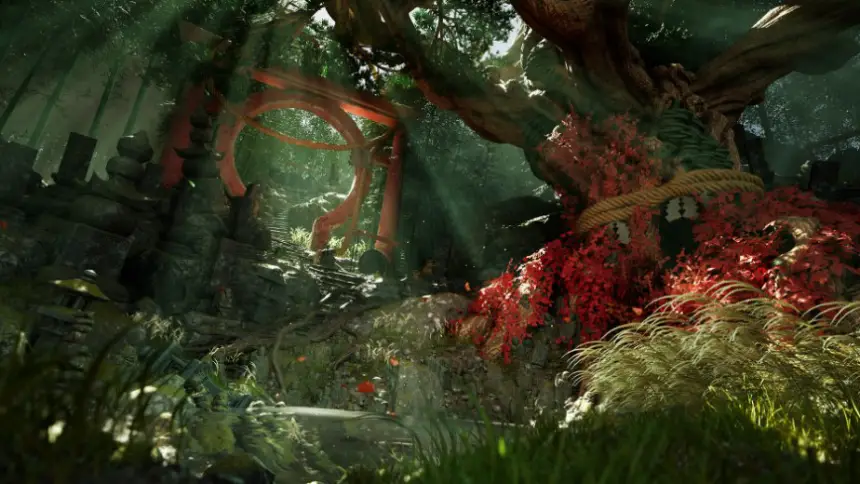
Japanese Forest Grave
Description
High quality, scene with 114 static meshes, perfect for lighting practice with showcase scenes.
Fully game ready.
Showcase Video: https://youtu.be/brs7yY-KG54
Props: 114 Props, Foliage, Ground Scatter and Rocks assets combined.
Materials: Custom asset material relying on masks and tileable materials, vertex blending shader on applicable materials and Parameters for roughness, normal intensity, Detail normal map and more.
Only works on UE5.1 and above as it's using lumen and the scene is foliage heavy.
Levels: 1 Overview level and showcase scene
!!IMPORTANT!!
Please enable the following settings under.
Edit->Project settings->Rendering
https://docs.unrealengine.com/4.26/en-US/RenderingAndGraphics/VirtualTexturing/
Virtual Textures
Enable Virtual Texture Support: Enable
Enable Virtual Texture Lightmaps: Enable
Reflections
Reflection Capture Resolution: 256
Lumen
Use Hardware Ray Tracing When available: Enabled
Software Ray Tracing Mode: Detail Tracing
Hardware Ray Tracing.
Support Hardware Ray Tracing: Enabled
Optimizations
Early Z-pass: Opaque and Masked Meshes
Post-process volume may require exposure changes. (NAME: PPV_Main)
Exposure compensation set to value=0 to get similar results as screenshots.
Please restart engine after these steps.
Features:
- Fully Lumen lit
- Nanite And non-nanite bamboo trees
- Showcase scene included
Number of Unique Meshes: 35
Collision: Yes, custom or autogenerated.
Vertex Count: 50 to 1.300.000 (Tree actor)
LODs: (Yes)
Number of Materials and Material Instances: 66
Number of Textures: 144
Texture Resolutions: 256-4096
Supported Development Platforms:
Windows: (Yes)
Mac: (Yes)
Important/Additional Notes: The scene uses Lumen and does not contain lightmaps.
The scene is running at 25fps with whole the scene in view.
On threadripper 1950x, RTX 2080 at 1440p, 100%render scale with High quality preset
!!IMPORTANT!!
Please enable the following settings.
Edit->Project settings->Rendering
https://docs.unrealengine.com/4.26/en-US/RenderingAndGraphics/VirtualTexturing/
Virtual Textures
Enable Virtual Texture Support: Enable
Enable Virtual Texture Lightmaps: Enable
Reflections
Reflection Capture Resolution: 256
Lumen
Use Hardware Ray Tracing When available: Enabled
Software Ray Tracing Mode: Detail Tracing
Hardware Ray Tracing.
Support Hardware Ray Tracing: Enabled
Optimizations
Early Z-pass: Opaque and Masked Meshes
Related assets